Represent the system.
Create native and physical models or bring in suitable FMUs. Define the behaviour, parameters and interfaces needed for the question you want to answer.
MIL: explore model behaviour
DEVLINK ENGINEERING PLATFORM · DEP
DEP builds one System from your models, FMUs and compiled ECU software, runs it in MIL and SIL in deterministic logical time, and keeps every result as traceable evidence.
Discuss a DEP evaluation ↗Read the documentation ↗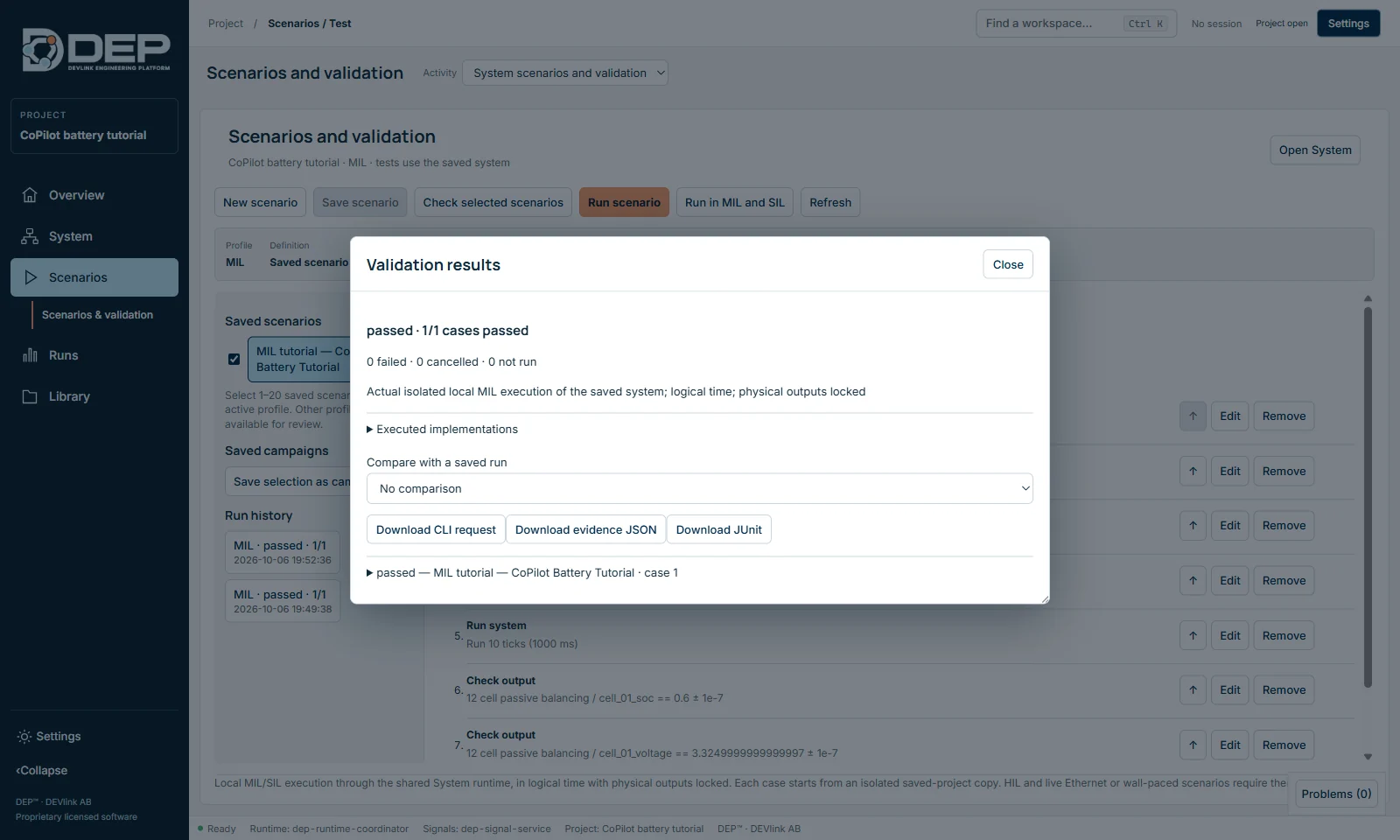
THE ENGINEERING CHALLENGE
A battery model can behave as expected on its own. A controller can pass its isolated tests. The next question is how they behave together—across operating modes, limits and software changes.
DEP brings model engineering and virtual software verification into a shared workflow. Connect the plant, controller software and scenario so that the team can investigate the system interaction.
FROM MODEL TO SOFTWARE
Create native and physical models or bring in suitable FMUs. Define the behaviour, parameters and interfaces needed for the question you want to answer.
MIL: explore model behaviourBring controller software into the virtual system as a vECU. Connect its signals to the surrounding models and define the execution assumptions.
SIL: investigate real softwareApply operating conditions, inspect results and compare the response against expected behaviour. Keep the model, configuration and evidence associated with the run.
Evidence: explain the resultWHAT IS IN DEP
Compose the System on the Model Flow canvas. Each component can carry a MIL model and a SIL implementation, connected through signal mappings.
Native block diagrams and state machines for controllers, supervisors and sequencers. Check the model, prepare it for the System or export it as an FMU.
Executable electrical networks with sources, resistors, capacitors, switches, HV contactors, battery cells and packs, and loads.
127 reference definitions across EV and hybrid, electrical, thermal, hydraulic, aerospace and UAS systems, ready to adapt.
FMI 2 and FMI 3 FMUs, an SSP 2.0.1 subset, and your own compiled software as a virtual ECU through documented adapters, including SIL Kit. Packages are inspected and approved before they run.
Virtual CAN, CAN FD, LIN and ARINC 429/825 built from DBC, LDF and FIBEX, with generators and a live decoded trace.
Campaigns of up to 100 cases, run in MIL and SIL. Evidence as JSON, JUnit and HTML with a SHA-256 manifest, plus a headless automation interface for CI.
Operator pages with gauges, trends and alarms. Trace, run comparison, record and replay, CSV and Vector ASC export, and A2L-based offline calibration experiments.
Turn requirements into a model with a rule-based builder. An optional AI assistant works only with your approval for each request, including local AI endpoints.
VIRTUAL NETWORKS
Import the DBC, LDF or FIBEX files your project already uses, map components to network nodes and let generators provide the rest of the bus. Every frame is decoded live and kept with the run.
Networks and restbus in the documentation ↗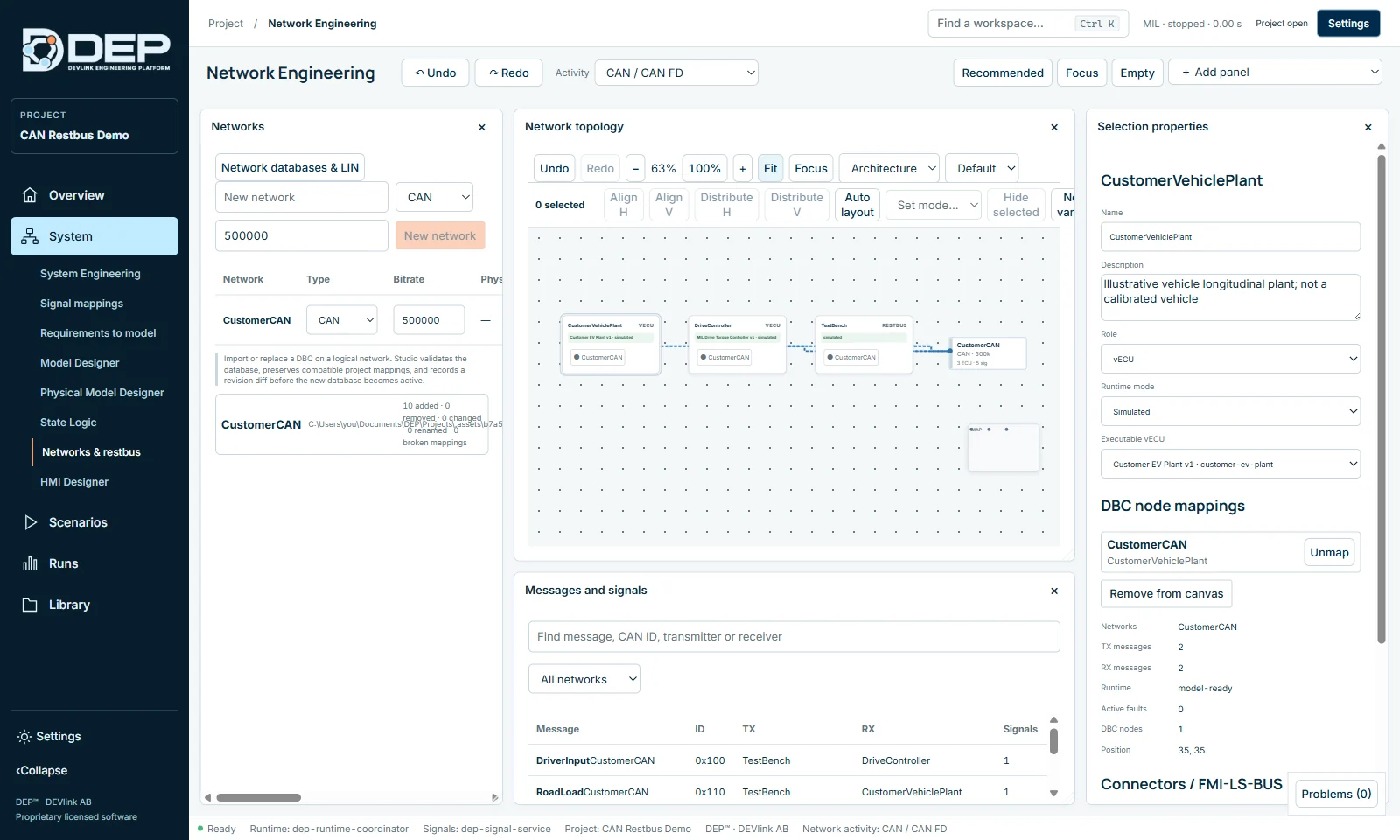
FROM MIL TO SIL
“Run in MIL and SIL” executes each selected case in both profiles and reports the verdict per profile and the largest difference for every output. You see exactly where the software departs from the model.
The System advances in fixed ticks. The same inputs give the same results, run after run.
Every scenario case starts from an isolated copy of the saved project, so one test never leaks into the next.
Evidence records the project revision, implementation hashes, samples and verdicts. DEP never reports a pass it did not observe.
WORKS WITH YOUR TOOLCHAIN
DEP focuses on MIL and SIL. For charging communication and hardware-in-the-loop it works with dedicated tools instead of reinventing them.
FMI 2 and 3, SSP and SIL Kit let DEP exchange models and co-simulate with the tools your teams already use.
An editable MIL charging session from 20 to 80 % needs no protocol peer. Live ISO 15118-20 DC sessions connect to a separately licensed ChargeLink.
DEP has no HIL engine of its own. Real-time HIL runs on NI VeriStand; the DEP gateway discovers VeriStand 2024 Q4 targets, reviews a deployment and observes channels.
THREE SECTORS. ONE E-MOBILITY FOCUS.
Explore battery and BMS behaviour, charging interactions, power electronics and energy-management software in representative vehicle scenarios.
Automotive applications ↗Investigate battery systems, electrical power distribution and supervisory control across flight-related operating modes and ground-energy scenarios.
Aerospace applications ↗Explore battery-powered machinery, mobile equipment, charging interfaces and energy use across representative industrial work cycles.
Industrial applications ↗CAPABILITY BOUNDARIES
We document the boundaries as carefully as the features, so your evaluation has no surprises.
Read the capability boundaries ↗LICENSING
DEP editions follow how people work with the platform. Licences add up: install more than one and their features combine. Every licence includes free security updates.
For test operators.
For model and control engineers.
For software and system integrators.
For HIL benches running NI VeriStand.
For teams sharing DEP.
HOW LICENSING WORKS
Prices depend on the editions and the licence type. Tell us how your team will use DEP and we will send a quote.
Request a quote ↗BEFORE YOU DECIDE
MIL investigates modelled system and control behaviour. SIL brings compiled controller software into the same virtual System. In DEP both run the same scenarios, so the results can be compared case by case.
Yes. DEP runs FMI 2 and FMI 3 FMUs (Windows x64) and your own software as a virtual ECU through documented adapters. Every package is inspected and explicitly approved before it runs. Bring the exact formats and versions to the evaluation.
No. DEP runs MIL and SIL on the desktop in deterministic logical time with simulated networks. For hardware-in-the-loop, DEP works with NI VeriStand as the real-time platform.
DEP models the system: battery, power electronics, controllers. ChargeLink handles EV charging communication. DEP’s MIL charging session needs no protocol; live ISO 15118-20 sessions use a separately licensed ChargeLink.
No. AI is optional and only used in Requirements to model. Nothing is sent without your approval for each request, and local AI endpoints are supported.
DEVlink’s MIL Studio capabilities have moved into DEP, which is the product for model engineering and connected MIL and SIL verification.
DEP DOCUMENTATION
YOUR NEXT ENGINEERING QUESTION
Let’s define a MIL or SIL evaluation around your e-mobility system and the behaviour you need to understand.